

Want to display live weather conditions from your Davis Instruments WeatherLink station—without bulky widgets, intrusive third-party branding, or clunky layouts?
The TheAVCoach Weather Station for WeatherLink plugin is your elegant solution. Built for WordPress and powered by the official WeatherLink API v2 (including the free Basic plan), this plugin gives you complete control over how current weather data appears on your site.
Smart, Future-Proof Design: Automatically detects your Davis station type and maps ALL weather variables—no matter which model you own. Whether you have a Vantage Vue, Pro2, Pro2 Plus, or any future Davis station, this plugin adapts automatically.
Developer-Friendly: Includes built-in mock data testing for development and demonstration, plus drag-and-drop variable ordering for perfect customization.
Whether you’re a developer, designer, or everyday site owner, you can easily drop in real-time, cache-optimized, fully customizable weather displays using a shortcode or WordPress widget.
Weather Station for WeatherLink
by The AV Coach
What TheAVCoach Weather Station for WeatherLink Displays
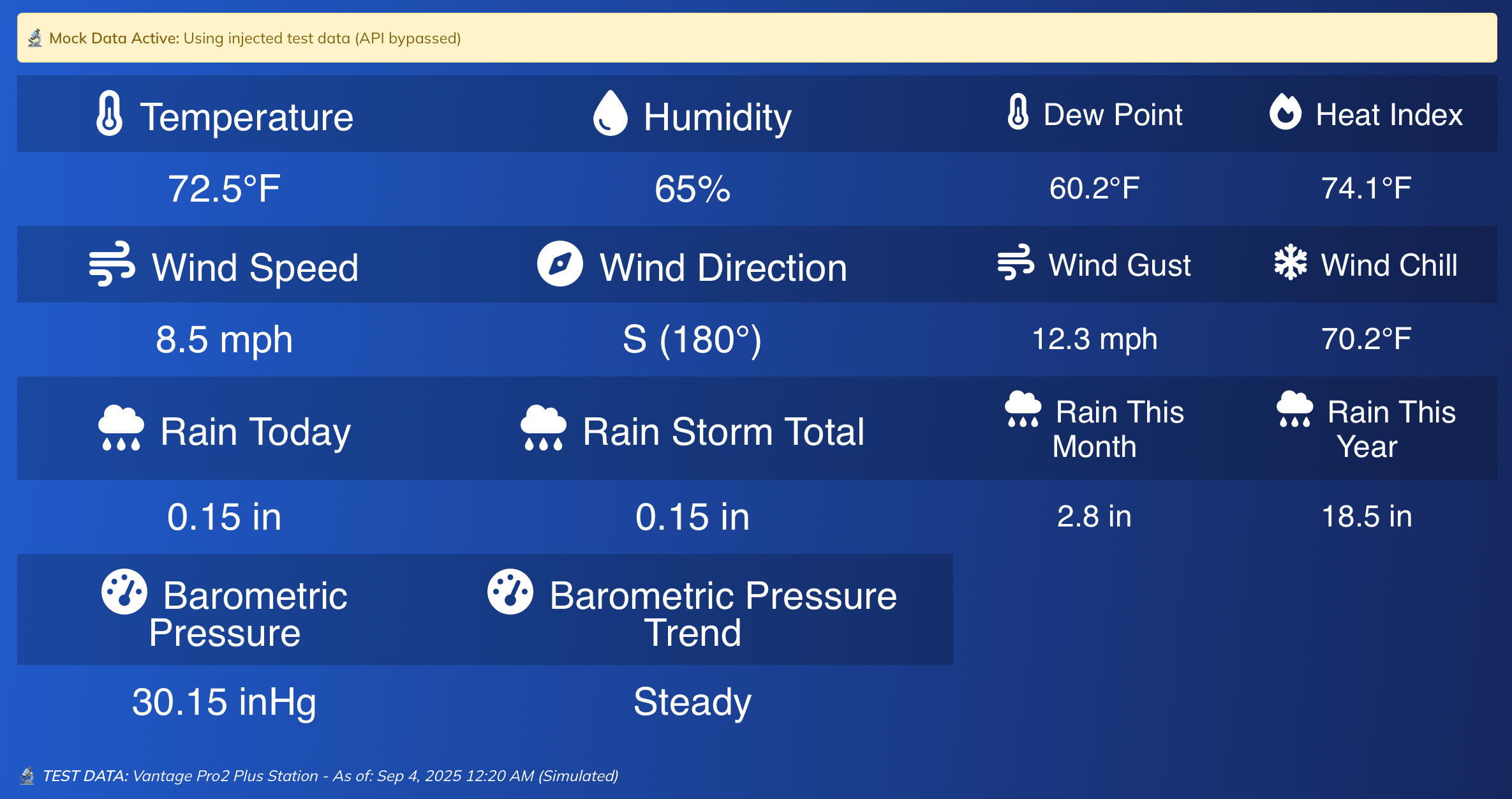
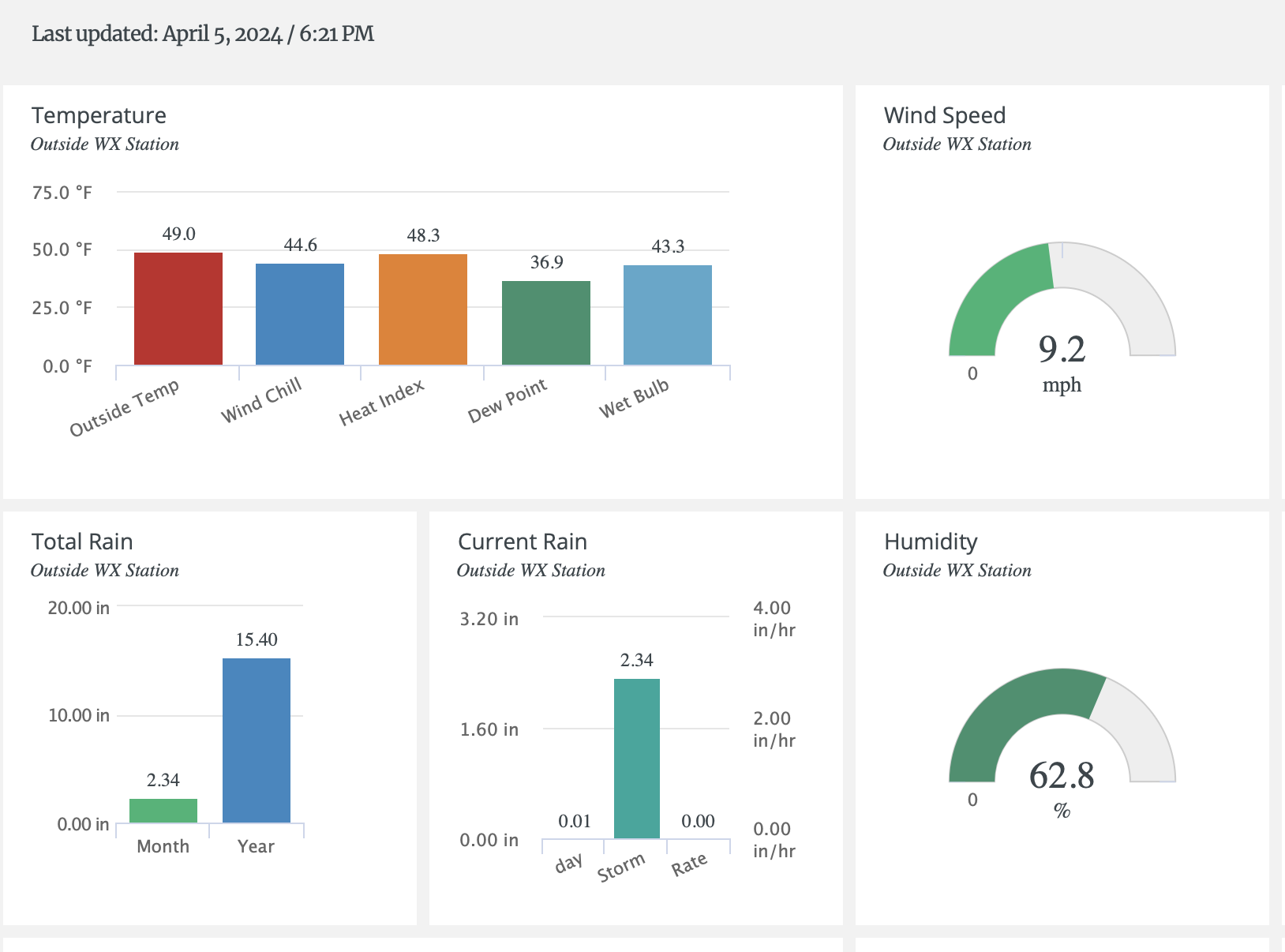
Get a clean and informative snapshot of current outdoor conditions — no indoor readings or clutter:
Automatically Detected Variables (works with ANY Davis station):
- Temperature: Current, dew point, heat index, wind chill
- Humidity
- Wind: Speed, direction, gusts
- Rainfall: Daily, storm total, monthly, yearly
- Barometric Pressure: Current reading + trend
- UV Index (automatically detected if your station supports it)
- Solar Radiation (automatically detected if your station supports it)
- Timestamp: Shows last updated time
Smart Features:
Supports both Imperial and Metric units
Automatic station detection and field mapping
Future-proof design (adapts to new Davis station models)
Automatic fallbacks: Displays “N/A” for missing data
Total Styling Control
Whether you’re matching a brand or keeping it minimal, TheAVCoach Weather Station for WeatherLink gives you unmatched design flexibility:
Typography & Layout:
- Choose your own Google Fonts
- Set font sizes, colors, and weights
- Customize label vs. value styling
- Add or remove borders between cells
- Control header background and opacity
Variable Management:
- Enable/disable specific weather variables
- Set Primary/Secondary priority levels
- Drag & drop variable ordering interface
- Real-time preview of changes
Advanced Styling:
- Separate styling for shortcode vs widget displays
- Font Awesome icons built-in for modern visuals
- Responsive design controls for mobile optimization
- Customizable timestamp styling and positioning
Display Options That Work for You
Shortcode
Add [theavcoach_weather] to any post, page, or block — it just works.
Sidebar Widget
Use the “TheAVCoach Weather Station for WeatherLink” widget in any widget-ready area. Both shortcode and widget use the same global configuration settings for consistent styling across your site.
Smart Configuration:
- Global settings control both shortcode and widget appearance
- No individual widget configuration needed
- Consistent styling across all weather displays
- Easy maintenance with centralized control
Responsive Design
- Desktop: Clean 4-column table layout with optimal spacing
- Mobile: Optimized single-column layout with touch-friendly design
- Widget: Automatically adapts to container width
- Shortcode: Responsive table that works on any screen size
Why Choose TheAVCoach Weather Station for WeatherLink?
Universal Compatibility:
- Works with ANY Davis WeatherLink station — automatically detected
- Future-proof design adapts to new station models without updates
- Universal field mapping — no manual configuration needed
Developer-Friendly:
- Built-in mock data testing for development and demonstration
- Comprehensive debug mode for troubleshooting
- WordPress coding standards compliance
WordPress Optimized:
- Works with any WordPress theme — no conflicts
- Tested up to WordPress 6.8
- Built for PHP 7.4+
- No personal data collected or stored
Perfect For:
- Local news and community sites
- Educational institutions with weather programs
- Weather stations and meteorological websites
- Outdoor activity and sports websites
- Personal weather enthusiast blogs
- Professional weather service providers
Smart Caching & Developer Tools
TheAVCoach Weather Station for WeatherLink is designed to be efficient, reliable, and developer-friendly:
Intelligent Caching:
- Custom cache intervals (1–60 minutes)
- Smart cache key management for optimal performance
- Automatic cache invalidation when settings change
- Instant styling updates (without waiting for cache expiry)
- Manual “Clear All Cache” button
Advanced Developer Tools:
- Mock Data Mode for development and preview
- Mock Tester: Choose station type (Vantage Vue, Pro2, Pro2 Plus, etc.) and generate realistic sample data
- Auto-refresh mock data when station type changes
- Comprehensive Debug Mode with detailed API structure analysis
- Real-time variable mapping display for troubleshooting
Testing & Development:
- Test all features without API credentials
- Generate realistic weather data for any Davis station type
- Debug API responses and field mappings
- Validate responsive design with various data sets


Who It’s For
Perfect for:
- Schools and campuses with a Davis station
- Local news and weather blogs
- Community event sites
- WordPress creators wanting full control over layout without using iFrames
How to Download It
The plugin is available for free:
(Upload this ZIP to your WordPress site via Plugins > Add New > Upload Plugin)
Also Available via WordPress.org
How to Set It Up
How to Set It Up
After installation:
- Install the plugin via WordPress
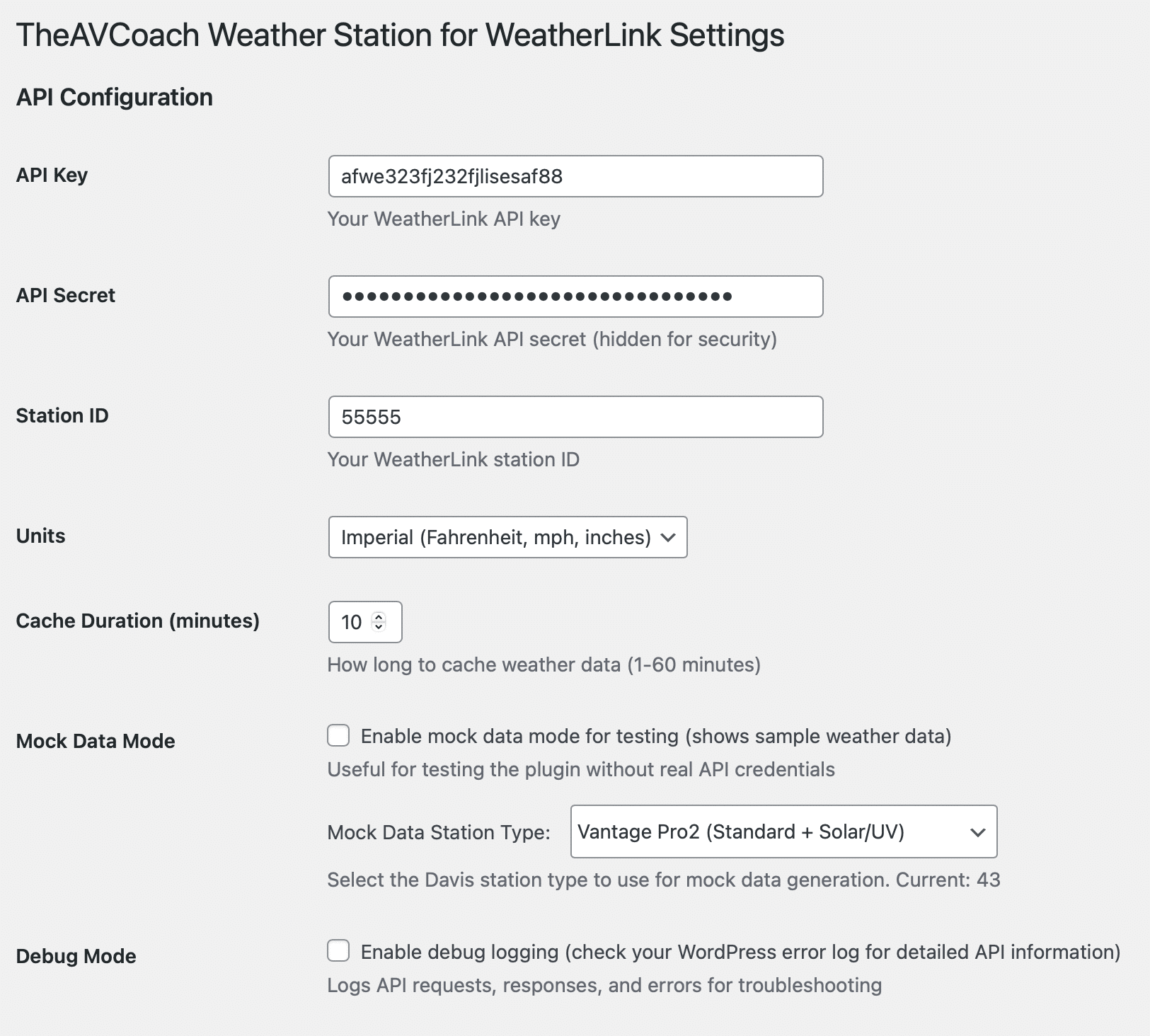
- Go to Settings → TheAVCoach Weather Station for WeatherLink
- Enter your WeatherLink API credentials:
• API Key
• API Secret
• Station ID - Your station type will be automatically detected and all weather variables will be mapped
- Configure your display:
• Units (Imperial or Metric)
• Font sizes, colors, and families
• Which weather elements to show (Primary/Secondary priority)
• Drag & drop variable ordering
• Cache duration (1-60 minutes) - Test with mock data (optional) using the built-in Mock Tester
- Use the shortcode
[theavcoach_weather]or the widget to display the output anywhere on your site
That’s it! Your weather data will automatically display with your chosen styling and configuration.
Additional Support: API & Station ID Help
Section 1: Generating Your Davis WeatherLink API v2 Key & Secret
- Sign up if you haven’t already at https://www.weatherlink.com or via your console and create your free account (sign in if you have)
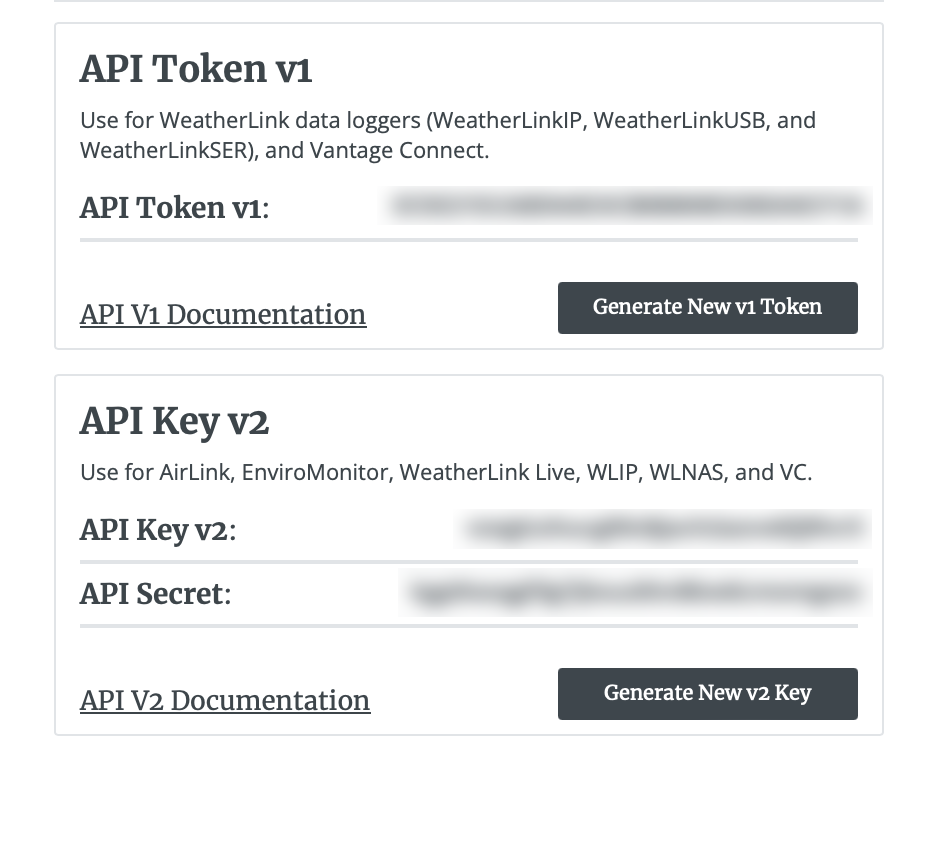
- In a web browser, with your WeatherLink account successfully authenticated, navigate to the account information section on the right side

- Next, generate the API Key V2 (this will reveal your API Key for V2 as well as your API Secret)

- Ensure your station is online and reporting data


Section 2: Obtain Your Station ID
- Open Terminal (macOS)/Command Prompt (Windows)
- Copy and paste this text (replacing the brackets with your own data previously obtained in section 1
curl -X GET "https://api.weatherlink.com/v2/stations?api-key={YOUR API KEY HERE}" -H "X-Api-Secret: {YOUR API SECRET HERE}" - Hit return to run that command, the results of which should reveal your station ID


FAQs
- Do I need a WeatherLink API key?
Yes — both an API key and secret from your WeatherLink® account are required. - What are the API limits on the Free plan?
1,000 calls per hour and 10 calls per second. - What versions are supported?
PHP: 7.4+ (tested on PHP 8.0.30)
WordPress: 5.0+ (tested with 6.8.1) - How is “Rain Storm” calculated?
Starts with first rainfall after dry period; ends after 24 hours of no rain.
Pro Tip
Even if you don’t have a Davis station or API access yet, you can test everything using the built-in Mock Mode — complete with realistic data, frontend previews, and debug tools.
BONUS!
How to bring your live outdoor weather data straight into your on-air broadcast using Ross XPression — the industry-standard CG platform.


Built by The AV Coach
Want clean, customizable, real-time weather without the noise?
TheAVCoach Weather Station for WeatherLink puts the power of your Davis station in your hands — on your site.
This plugin was originally built out of necessity — a reliable way to display live conditions in a responsive format (unlike the default embeds provided to users on the Davis WeatherLink network). After many late nights of development and testing, I’ve evolved it into a sophisticated, future-proof solution that automatically adapts to any Davis station model.
What makes it special:
- Universal compatibility — works with ANY Davis WeatherLink station
- Automatic detection — no manual configuration needed
- Future-proof design — adapts to new station models automatically
- Developer-friendly — includes mock data testing and comprehensive debugging
- Professional styling — complete control over appearance and layout
Built by someone who lives in the AV and broadcast trenches — and designed to perform, effortlessly.
WeatherLink is a registered trademark of Davis Instruments. This plugin is not affiliated with or endorsed by Davis Instruments.
Comments are closed